Linuxathome.net    -    Linux news and help for home broadband internet users  
 Home  |  Files  |  Case Mods  |  Reviews  |  Forum  |  Search  |  Links  |  RDF  |  Contact  |  Uptime  |  Server Info  |  Tracker
Sections
 

Installation Guide
Setting Up
Internet Sharing
Port Forwarding
Services Config
Installing Programs
Game Servers
Using IPTables
Useful Commands
Kernel Upgrading
System Recovery
Red Hat 7.2 Setup
OpenBSD Setup
BPA Login Setup
PPPoE Setup
Add New Hardware
Using PPTP VPN
Our RC5 Team
Folding@Home
Help Support Us


Articles
  Linux Security
NetStats FAQ
Linux KIS Trojan
CAT5/LAN Cables
Domain Names
Presario RH Install APC Debian DVD
 
 
Slashdot.org
 
  • Lessig's "In Defense of Piracy"
  • Hands-On With Microsoft's Touchless SDK
  • How Should I Teach a Basic Programming Course?
  • Looking for Earth-Like Exoplanets
  • EMP-Shielded Power Grids Under Development
  • CNET UK Credits Claim That Apple Will Release Networked TVs
  • British MoD Stunned By Massive Data Loss
  • UK Government Says More Spying Needed
  • Sprint's Xohm WiMax Network Debuts In Baltimore, Works Well
  • Computer-Aided Lego Art Project
  • How US Schools' Culture Stifles Math Achievement
  • Choosing a Replacement Email System For a University?
  • Artificial Gecko Adhesive, Now in Experimental Glue
  • Blizzcon Begins,
  • Verizon To Charge Content Providers $.03 Per SMS
  •  
     
    Affiliates

    AusForum.com
    TweakTown.com
    AusPCWorld.com
    ZGeek.com
    MyAcen.com


    Webmail
      E-mail Address:

    Password:


      Hercules Game Theater XP 6.1 and XPS 510 Surround Speakers Review


     Date: January 9th, 2002
     Type: Review
     Supplier: Guillemot
     Author: Mayhem
     RRP: $329 AUS (R.R.P.) for Game Theater XP 6.1, $199 AUS (R.R.P.) for XPS-510 Speakers
     

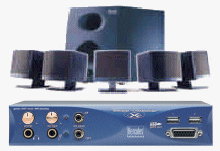
    Now for the Hercules XPS-510 Speakers, with more and more powerful games and home theater setups based on the Home Personal Computer there is an ever present push for more affordable surround sound speaker sets.

    Features

  • 5.1 kit with 60 Watts total output power
  • Ideal for 3D surround effect for your games and your Home Theater movie playback
  • Five independent satellites
  • 20 Watts Subwoofer encased in wooden enclosure for undistorted deep bass effects
  • Compatible with all sound cards and Dolby AC3 decoders
  • Three year Warranty
  • RRP $199
  • Being a complete six (6) speaker set gives you total surround sound with two front speakers, two read speakers, a center speaker and finally a Subwoofer. A great benefit from the satellites is that they are so small and easy to mount you can put them just about anywhere (you could even screw them to the wall by drilling through the mounting stands - which is exactly that these babies will be doing soon).

    Subwoofers are a fundamental part of any large audio system, no matter what sort of music you listen to a sub can always make your listening experience all the better, having the Subwoofer mounted in a wooden box with a port (the breathing whole at the front) allows maximum performance to be achieved with little power output.

    Technical Specifications
    Total Output Power 60 Watts RMS
    Subwoofer 20 Watts RMS
    Dual Satellites 5 x 8 Watts RMS
    Special Features Wooden Case Subwoofer Bass, Volume and On/Off Switch Power
    Game Compatibility DirectSound 3D, EAX 1.0, EAX 2.0, A3D 1.0, I3DL2, MacroFX, MultiDrive, ZoomFX, EnvironmentFX Sound Cards
    Audio Compatibility MP3 Player, CD Player and all sound cards
    DVD Compatibility All Dolby Prologic and Dolby AC3 Decoder

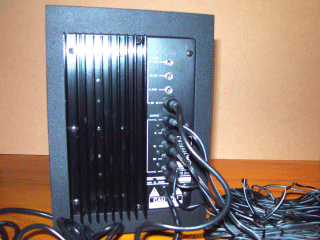
    The only main drawback from having all these speakers is the amount of wiring that is required, as you can see from this photo the back of the Subwoofer has all of the controls (inputs and outputs) for the system and is therefore the bottle neck for wiring, when you have you speakers all nicely setup it is strongly recommended that you use some cable ties or flexible wiring pipe to tidy up all the cables and prevent wires getting all tangled.
    By setting the six (6) speakers in proper locations and angling them towards your computer chair (where of course you will be sitting) you will improve the surround sound by making sure that you are in the center of focus. The best location for the Subwoofer is on the floor to the front of where you will be sitting (mainly because the cable is too long to reach behind and for best performance it should be mounted on the floor). The only real dilemma is where to put the center speaker, depending on your setup you most like wont have a central point for the speaker, in that case you should just mount in to the front (front center).

    * Image modified from a scan by Asher Moses from TweakTown.com

    NEXT: Setup, Testing and Conclusion


      Supplier Information


    Hercules Australia (a division of the Guillemot Corporation) have a wide variety of computer gaming and multimedia products from the Graphics Cards to Sound Cards, TV cards, Speakers and also other gaming equipment, they are one of the leading brands in todays rapid computer technology market. If you would like more information on the company then please visit there site: www.guillemot.com.au, alternatively if you would like to browse the Hercules product line then you can visit there Australian site: au.hercules.com.

    Sponsored Advertising
    [
    Warning: include(./ztmc/display.php) [function.include]: failed to open stream: No such file or directory in /home/mayhem/public_html/footer.php on line 1

    Warning: include(./ztmc/display.php) [function.include]: failed to open stream: No such file or directory in /home/mayhem/public_html/footer.php on line 1

    Warning: include() [function.include]: Failed opening './ztmc/display.php' for inclusion (include_path='.:/usr/lib/php:/usr/local/lib/php') in /home/mayhem/public_html/footer.php on line 1
    ]

    Hosted by the MyAcen Network

    Please read our Legal Notice for information concerning our site and its content.
    All logos and trademarks in this site are property of their respective owner. All the rest © 2000 - 2006 by Linuxathome.net

    Reviews
     

    D-Link DI-704P
    VIA EPIA-M 9000
    Tux Applique
    Ricoh MP5125A
    AMD XP 2600+
    3DProphet 9000Pro
    Radeon 9700 Pro
    XTNDAccess IrDA
    Netgear FS-524s
    DSR2161 KVM
    Game TheaterXP & XPS-510 Speakers
    3D Prophet 4000XT
    AutoView 400
    Back-UPS CS 350
    Dual Neon Kit
    SwitchView KVM
    20x4 LCD Kit
    Window Kit


    Kuro5hin.org
     
  • The Credit Crisis and the Bailout in Plain English
  • The Meat Hooker: Steak
  • To bail or not to bail, that is the question
  • The 700 Billion Dollar Question
  • Delicious, delicious irony
  • ''ASCII art'' in the 1950s
  • Sun Tzu for the new millenium: How-to E-Maul localroger
  • HOWTO: Avoid your civic duties, write a self-indulgent missive about the experience
  • HOWTO: Not Get Seated on a Death Penalty Jury
  • If thy blog post offend thee, pluck it out
  •  
     
    Google (Linux)
     
    Enter Keywords:


    Bash Jokes
     

    % \(-

    (-: Command not found.


    Virtualization, Virtual Machine & Virtual Server Consolidation - VMware

    Get Slackware Linux

    Use OpenOffice.org

    Use Asterisk